Dieser Artikel bezieht sich auf das Produkt Professional Email (powered by Titan). Wenn Sie ein Professional Email Indiviudal oder Teams nutzen bzw. ein Microsoft 365, gehen Sie bitte auf unsere FAQ Startseite https://www.hosteurope.de/faq/ und wählen Sie dort den richtigen Produktbereich Professional Email oder Microsoft 365 aus. Dort finden Sie die passenden Informationen.
Was ist E-Mail-Tracking im Titan Mail WebMailer?
Das E-Mail-Tracking im WebMailer von Titan dient dazu, den Zustellstatus einer E-Mail nachzuverfolgen. Es zeigt an, ob eine gesendete Nachricht erfolgreich an den empfangenden Mailserver übermittelt wurde.
Ein Rückschluss darauf, ob die E-Mail tatsächlich vom Empfänger gelesen wurde, ist nicht möglich.
Wie wird E-Mail-Tracking aktiviert?
-
Melden Sie sich im Titan Mail WebMailer an.
-
Erstellen Sie eine neue E-Mail.
-
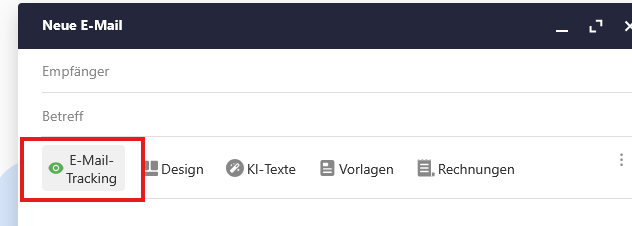
Aktivieren Sie die Tracking-Funktion im Editor.
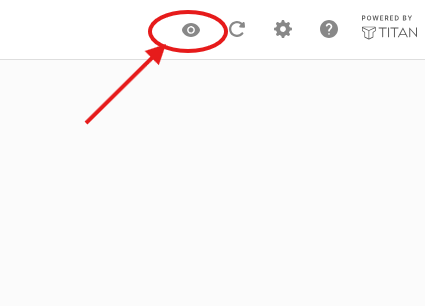
Ob eine E-Mail zugestellt wurde, sehen Sie dann im WebMailer oben rechts, wenn Sie auf das Auge klicken:
English Version:
This article refers to the Professional Email product (powered by Titan). If you use Professional Email Individual or Teams or Microsoft 365, please go to our FAQ homepage https://www.hosteurope.de/faq/ and select the correct product area, Professional Email or Microsoft 365. There you will find the relevant information.
What is email tracking in Titan Mail WebMailer?
Email tracking in the WebMailer by Titan is used to monitor the delivery status of an email. It indicates whether a sent message has been successfully transmitted to the recipient’s mail server.
It is not possible to determine whether the email has actually been read by the recipient.
How is email tracking activated?
- Log in to the Titan Mail WebMailer.
- Create a new email.
- Enable the tracking function in the editor.
Whether an email has been delivered can be seen in the WebMailer in the top right corner by clicking on the eye icon: