Falls Sie Ihr Microsoft 365 Exchange Konto noch nicht in Thunderbird eingebunden haben und dies nun das erste mal einrichten möchten, finden Sie eine Anleitung in diesem FAQ Artikel.
Anfang dieses Jahres kündigte Microsoft an, dass das Verbindungsprotokoll Exchange Web Services (EWS) ab Oktober 2026 schrittweise abgeschaltet wird, mit dem Ziel einer vollständigen Deaktivierung im Jahr 2027. Wenn Sie Thunderbird derzeit mit einem Microsoft 365 E‑Mail‑Konto über EWS verwenden, müssen Sie auf das Verbindungsprotokoll Microsoft Graph API umsteigen, damit Thunderbird auch über diese Termine hinaus funktioniert. Die Graph‑API‑Unterstützung ist in Thunderbird-Version 154 und höher verfügbar.
Thunderbird kann Konten nicht zwischen Protokollen migrieren. Sie müssen daher ein neues Konto einrichten. Falls Sie bereits ein Microsoft 365‑Konto über EWS verbunden haben, löschen Sie es zuerst in Thunderbird über das App‑Menü:
- ☰ > Kontoeinstellungen > links Ihr EWS‑Konto auswählen > Löschen.
Das lokale Löschen des Kontos hat keinerlei Auswirkungen auf Daten, die in Microsoft 365 gespeichert sind; Ihre Daten bleiben sicher.
Nachdem das alte EWS‑Konto gelöscht ist, richten Sie über den Account‑Hub ein neues Konto im App‑Menü von Thunderbird ein:
- ☰ > Konto hinzufügen > E‑Mail und geben Sie Ihre bei Microsoft 365 gehostete E‑Mail‑Adresse ein.
Thunderbird sollte automatisch erkennen, dass das Konto über Microsoft 365 läuft und Ihnen mehrere Verbindungsoptionen anbieten. Wählen Sie die Option Microsoft Graph API, sobald die Liste der verfügbaren Protokolle angezeigt wird.
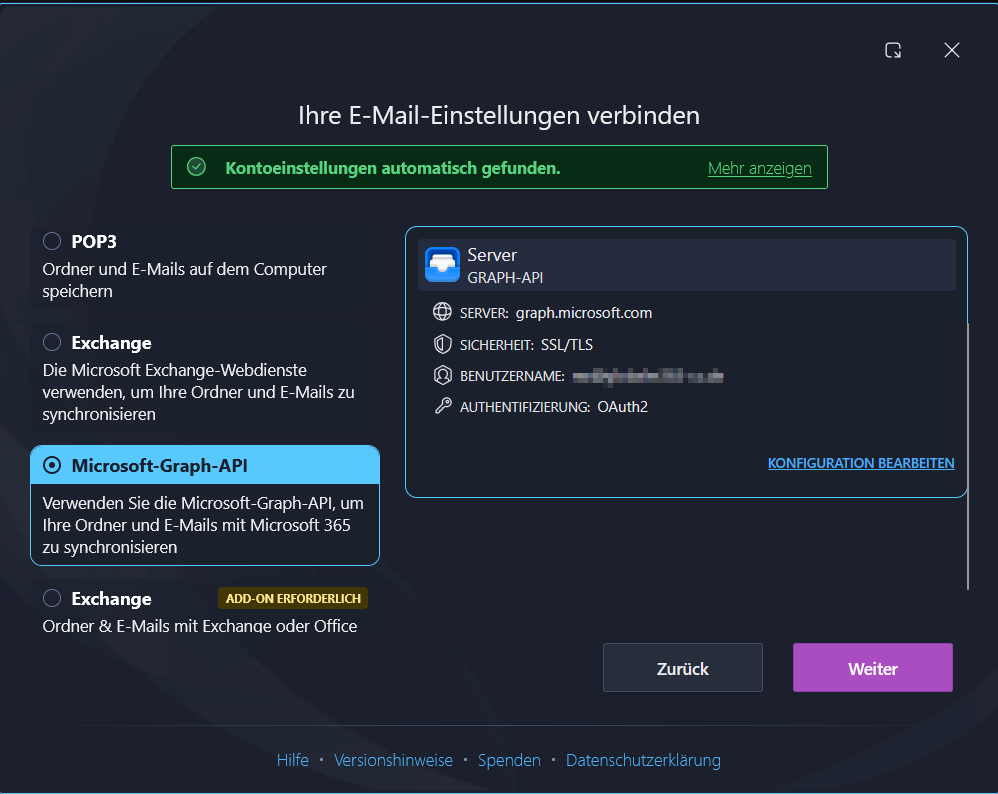
Die Anmeldung wird über ein Browserfenster bestätigt, welches sich in Ihrem Standardbrowser öffnet.
English Version:
How can I switch from Exchange(EWS) to Microsoft Graph API in Thunderbird? (EWS shutdown for M365 starting in October 2026)
If you haven’t yet added your Microsoft 365 Exchange account to Thunderbird and want to set it up for the first time, you’ll find a guide in this FAQ article.
Early this year, Microsoft announced that the Exchange Web Services (EWS) connection protocol will be gradually shut down starting in October 2026, with the goal of full deactivation in 2027. If you are currently using Thunderbird with a Microsoft 365 email account via EWS, you must switch to the Microsoft Graph API connection protocol so Thunderbird continues to work beyond these dates. Graph API support is available in Thunderbird version 154 and higher.
Thunderbird cannot migrate accounts between protocols. Therefore you need to set up a new account. If you already have a Microsoft 365 account connected via EWS, delete it first in Thunderbird via the App menu:
- ☰ > Account Settings > select your EWS account on the left > Delete.
Deleting the account locally has no impact on data stored in Microsoft 365; your data remains secure.
After the old EWS account is deleted, set up a new account via the Account Hub in Thunderbird’s App Menu:
- ☰ > Add Account > Email and enter your Microsoft 365-hosted email address.
Thunderbird should automatically detect that the account is hosted via Microsoft 365 and offer you several connection options. Choose the Microsoft Graph API option as soon as the list of available protocols is displayed.
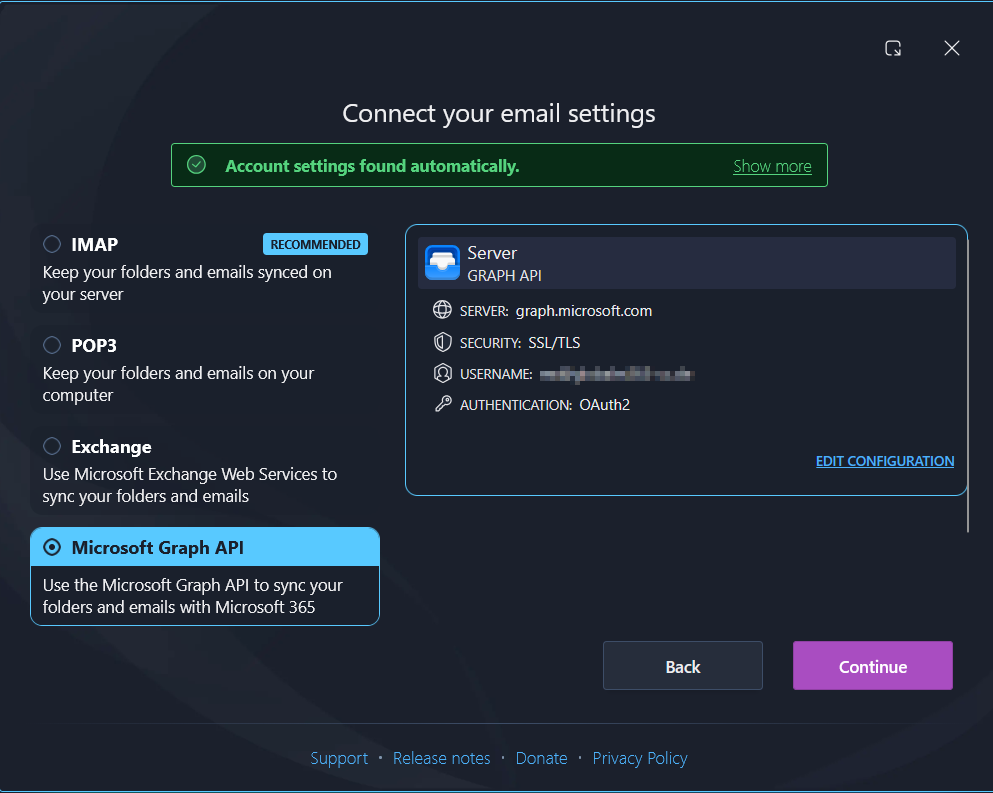
Signing in is confirmed in a window that pops open in your default browser.