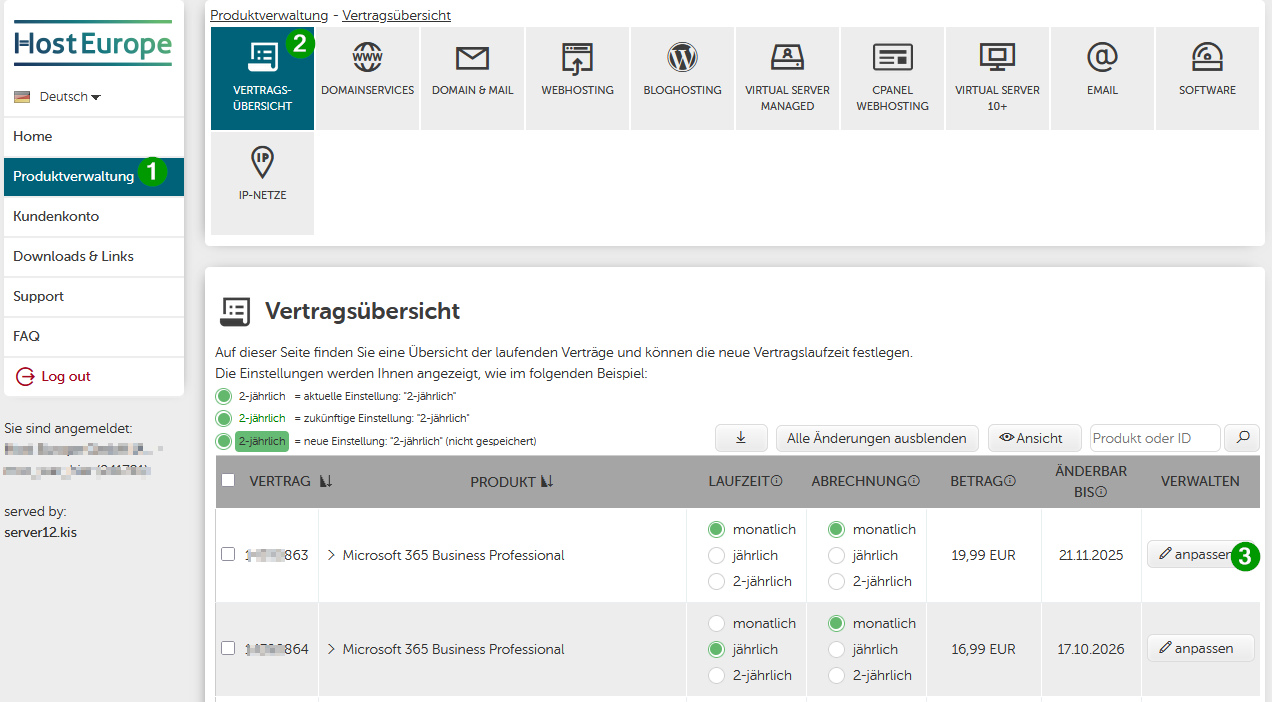
Eine Übersicht all Ihrer gebuchten Produkte und Services finden Sie in der Vertragsübersicht im KIS. Diese erreichen Sie über den folgenden Menüpunkt im KIS:
- Produktverwaltung - Vertragsübersicht
oder über den nachfolgenden Link
Über die Vertragsübersicht können Sie die Produkte kündigen bzw. werden dort an die richtige Stelle im KIS geführt, um die Kündigung vorzunehmen.
Bitte erlauben Sie uns vorab ein paar Hinweise
- Domains müssen immer separat gekündigt werden! Diese werden nicht automatisch gekündigt, da sie als eigene Verträge geführt werden. Informationen zur Kündigung von Domains finden Sie unter Wie kann ich meine Domain löschen oder zum Transfer frei geben lassen?
- Bei der Kündigung Ihres Hosting-Pakets erhalten Sie einen Hinweis zur Löschung von E-Mail-Konten. Dieser gilt nur für E-Mail-Konten, die direkt im Hosting-Paket angelegt wurden – nicht für Ihre Microsoft 365 E-Mail-Adressen.
- SSL-Zertifikate müssen nicht gekündigt werden. Sie laufen automatisch aus. Lediglich der Verlängerungsservice im KIS muss unter der entsprechenden Kachel über die Produktverwaltung deaktiviert werden.
Bitte prüfen Sie Ihre Einstellungen diesbezüglich.
- Add-Ons werden mit dem Paket automatisch mit gekündigt. Sofern Sie nur ein Add-On kündigen möchten, finden Sie die Vorgehensweise im Artikel Wie kündige ich ein Add-On?
- Einige Produkte können leider nicht über das Kundeninformationssystem gekündigt werden. In diesem Fall benötigen wir eine E-Mail von einem der hinterlegten Ansprechpartner, unter Angabe des zu kündigenden Produktes sowie des Vor- und Nachnamens des Ansprechpartners. Dabei ist es notwendig, dass die Kündigung von einer E-Mail-Adresse aus gesendet wird, die unter Ihrer Kundennummer hinterlegt ist. Sie können die Kündigung an vertrag@hosteurope.de senden.
Nachfolgend finden Sie eine Schritt-für-Schritt Anleitung für ein WebHosting-, cPanel- oder E-Mail-Paket. Kündigungen für Virtual Server und viele andere Produkte erfolgen aber auf dem selben Weg.
Schritt 1 von 4
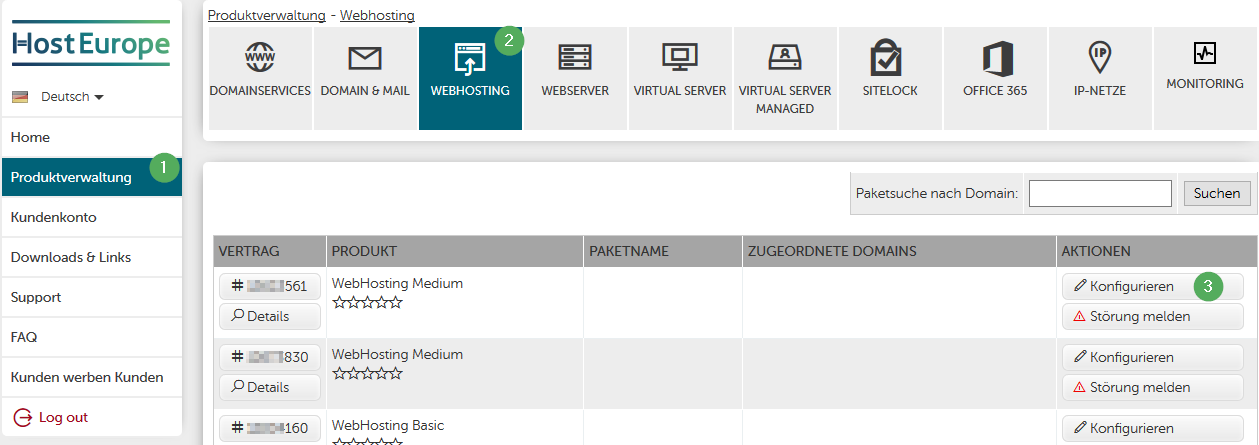
- 1. Bitte wählen Sie im Menü links Produktverwaltung aus.
- 2. Wählen Sie den Produktbereich aus, in dem das zu kündigende Produkt verwaltet wird, z.B. WebHosting.
- 3. Klicken Sie auf Konfigurieren oder Vertrag kündigen neben dem Produkt das Sie kündigen möchten.
cPanel- und E-Mail-Produkte
In der Vertragsübersicht Ihrer cPanel- und E-Mail-Produkte wird nach Nutzung des Buttons "Vertrag kündigen" über ein Popup-Fenster das nächstmögliche Kündigungsdatum sowie die jeweilige zugehörigen E-Mail-Verträge mit dem jeweiligen nächstmöglichen Kündigungsdatum angezeigt. Wählen Sie hier bitte die jeweilig gewünschten Daten aus, geben Ihren Kündigungsgrund an und klicken auf "Weiter" bzw. führen den Kündigungsprozess bis zum Ende durch.
Wichtig: Der Vertrag ist erst gekündigt, wenn Sie "Jetzt Vertrag kündigen" bestätigten. Sie erhalten daraufhin eine Kündigungsbestätigung.
Schritt 2 von 4
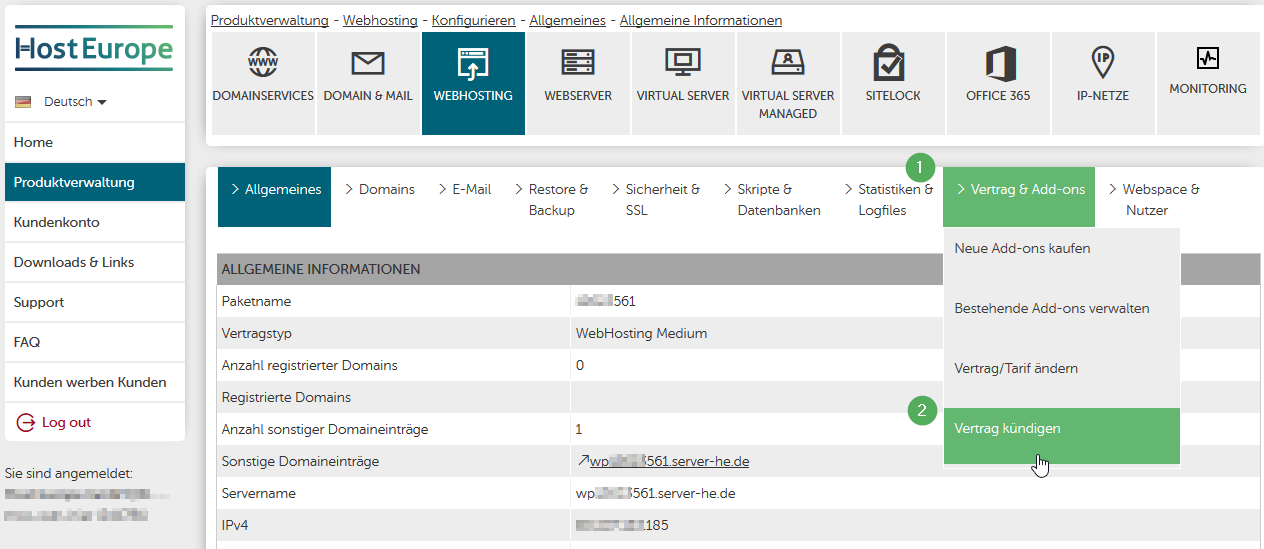
- Klicken Sie bitte im Menü Vertrag & Add-ons auf Vertrag kündigen.
Schritt 3 von 4
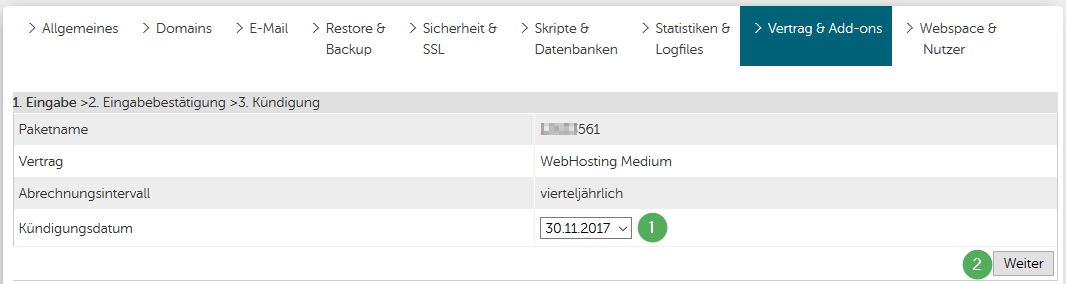
- 1. Wählen Sie das Kündigungsdatum aus. Das System schlägt das frühestmögliche Kündigungsdatum entsprechend der Vertragslaufzeit und Kündigungsfrist vor. Sollten Sie ein Kündigungsdatum wünschen, das nach dem vorgeschlagenen Datum liegt, wenden Sie sich bitte an uns (vertrag@hosteurope.de).
- 2. Klicken Sie auf Weiter.
Schritt 4 von 4
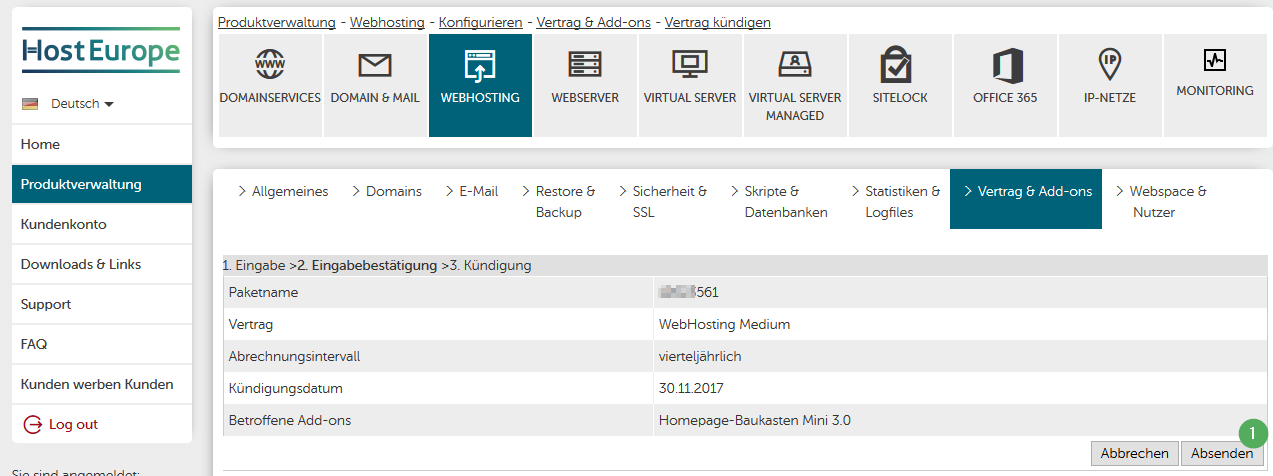
- Bestätigen Sie die Kündigung abschließend in dem Sie auf Absenden klicken.
- Sie erhalten abschließend eine E-Mail zur Bestätigung der Kündigung an die in Ihrem Stammdaten hinterlegte Standard-E-Mail-Adresse
English Version:
How can I cancel my contract?
You can find an overview of all your booked products and services in the contract overview in the KIS. You can access this via the following menu item in the KIS:
- Product Management - Contract Overview
or via the following link
Via the contract overview, you can cancel products or will be directed to the correct place in the KIS to proceed with the cancellation.
Please allow us a few notes in advance
-
Domains must always be cancelled separately! They are not cancelled automatically as they are maintained as separate contracts. Information on cancelling domains can be found under How can I delete my domain or have it released for transfer? (This article is only available in German.)
-
When cancelling your hosting package, you will receive a notice regarding the deletion of email accounts. This only applies to email accounts that were created directly in the hosting package – not to your Microsoft 365 email addresses.
-
SSL certificates do not need to be cancelled. They expire automatically. Only the renewal service in the KIS must be deactivated under the corresponding tile via product management.
Please check your settings in this regard. -
Add-ons are automatically cancelled along with the package. If you only want to cancel an add-on, you can find the procedure in the article How do I cancel an add-on?
-
Unfortunately, some products cannot be cancelled via the customer information system. In this case, we require an email from one of the registered contact persons, stating the product to be cancelled as well as the first and last name of the contact person. It is necessary that the cancellation is sent from an email address that is registered under your customer number. You can send the cancellation to vertrag@hosteurope.de .
Below you will find step-by-step instructions for a web hosting, cPanel or email package. Cancellations for virtual servers and many other products are made in the same way.
Step 1 of 4
- Please select Product Admin (or Produktverwaltung) from the menu on the left.
- Select the product area in which the product to be cancelled is managed, e.g. Web Hosting.
- Click on Configure or cacnel contract next to the product you wish to cancel.
cPanel- und E-Mail-Products
In the contract overview of your cPanel and email products, after using the "Cancel contract" button, a popup window will display the next possible cancellation date as well as the respective associated email contracts with their next possible cancellation dates. Please select the desired dates, provide your reason for cancellation and click on "Continue" or complete the cancellation process to the end.
Important: The contract is only cancelled once you have confirmed "Cancel contract now". You will then receive a cancellation confirmation.
Step 2 of 4
Please click on Canel contrat in the Contract & Add-ons menu.
Step 3 of 4
- Select the cancellation date. The system suggests the earliest possible cancellation date according to the contract term and notice period. If you wish to have a cancellation date that is after the suggested date, please contact us (vertrag@hosteurope.de ).
- Click on Continue.
Step 4 of 4
Finally, confirm the cancellation by clicking on Submit.
You will then receive an email confirming the cancellation to the default email address stored in your master data.