Der folgende Artikel dient der Änderung der primären Domain in Ihrem cPanel Hosting Paket.
ACHTUNG: Die Änderung der primären Domain wirkt sich auf Webanwendungen und E-Mail-Adressen aus. Die Domain ändert sich aktiv bei den bereits angelegten E-Mail-Adressen.
Wenn Sie Ihre primäre Domain ändern möchten, ist das in Ihrem "Mein Hosting" möglich. (Erläuterung Login)
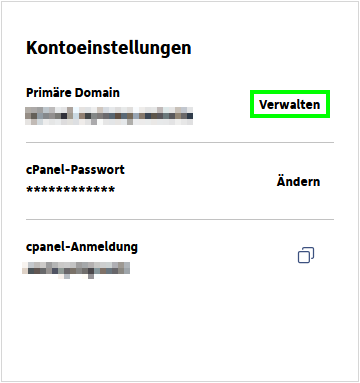
Dort klicken Sie oben auf "Einstellungen" und dann rechts neben der aktuellen primären Domain auf "Verwalten":
Nun können Sie die neue primäre Domain eingeben.
Der Verzeichnispfad der "Primären Domain" lautet immer und unabänderbar: "/public_html"
Sofern Ihre Webanwendung einen spezifischen Pfad benötigt, verbinden Sie die dazugehörige Domain als "Add-on-Domain" und nicht als "Primäre Domain" mit Ihrem cPanel-Produkt.
Die Domain der bereits angelegten E-Mail-Adressen wird bei der Änderung der "Primären Domain" automatisch angeglichen. Wurde beispielsweise zuvor die Domain "domain-eins.tld" als "Primäre Domain" verwendet und durch die Domain "domain-zwei.tld" ersetzt, so ändern sich die bereits angelegten E-Mail-Adressen wie folgt: nutzer@domain-eins.tld -- wird zu --> nutzer@domain-zwei.tld Sofern Sie die E-Mail-Adresse "nutzer@domain-eins.tld" weiterhin verwenden möchten, muss diese entsptrechend neu im cPanel-Produkt eingerichtet werden.
English version:
How do I change the primary domain?
The following article is about changing the primary domain in your cPanel hosting package.
ATTENTION: Changing the primary domain affects web applications and email addresses. The domain changes actively for the email addresses that have already been created.
If you want to change your primary domain, this is possible in your "My Hosting". (Explanation of login)
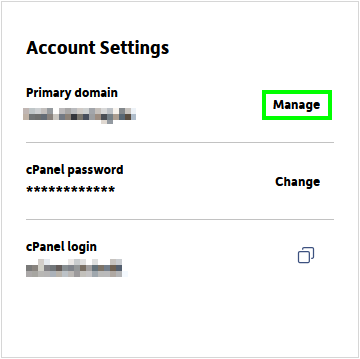
There, click on “Settings” at the top and then on “Manage” to the right of the current primary domain:
Now you can enter the new primary domain name.
The directory path of the "Primary Domain" is always and unchangeable: "/public_html".
If your web application requires a specific path, connect the associated domain to your cPanel product as an "Add-on Domain" and not as a "Primary Domain".
The domain of the already created e-mail addresses will be automatically adapted when the "Primary Domain" is changed.
For example, if the domain "domain-one.tld" was previously used as the "Primary Domain" and replaced by the domain "domain-two.tld", the e-mail addresses that have already been created will change as follows:
nutzer@domain-eins.tld -- becomes --> nutzer@domain-zwei.tld
If you would like to continue to use the e-mail address "nutzer@domain-eins.tld", it must be set up again in the cPanel product accordingly.