Aktuell erhalten wir vermehrt Rückmeldungen, dass der E-Mail-Versand über den Webmailer der Classic Hosting Produkte zu Mailrückläufern führt.
Die Fehlermeldung lautet zum Beispiel wie folgt und enthält unter anderen auch einen Link zu einer Erläuterungseite.
SMTP error from remote mail server after end of data:
554-Transaction failed
554-Reject due to policy restrictions
Laut aktuellem Kenntnisstand sind nicht alle über den Webmailer ausgehenden E-Mails betroffen, sondern nur ein ein kleiner Teil. Es ist daher notwendig, dass dies weiter untersucht wird. Unsere Fachabteilung ist bereits in Kenntnis gesetzt und wird dies entsprechend prüfen.
In der Zwischenzeit können Sie die betroffene E-Mail mit dem folgenden Workaround erneut senden oder generell vorübergehend bis zur Klärung beim E-Mail-Versand den Workaround anwenden:
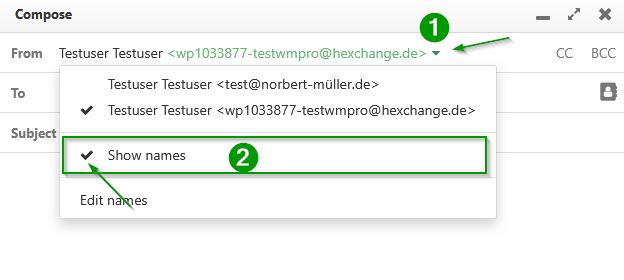
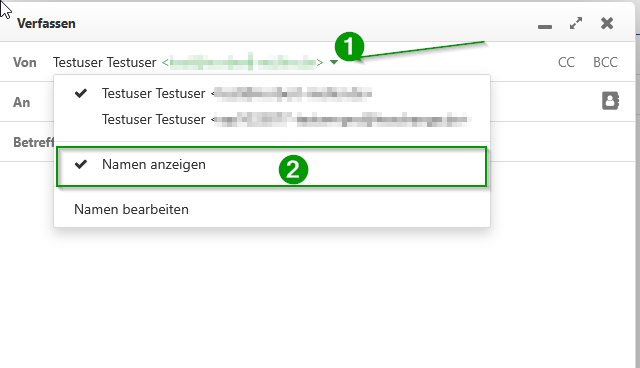
Beim Versenden einer E-Mail über den Webmailer können Sie rechts neben der Absenderadresse auf den kleinen Pfeil klicken (1). Deaktivieren Sie anschliessend den Anzeigenamen(2), indem Sie im Feld "Namen Anzeigen" das Häkchen enfernen. Schreiben Sie dann ganz normal Ihre E-Mail und versenden diese an den Empfänger.
English Version:
Classic Hosting Webmailer - Current Issues with Email Sending
We are currently receiving an increasing number of reports that sending emails via the webmailer of the Classic Hosting products is leading to mail bounces.
The error message reads, for example, as follows and also contains a link to an explanation page.
SMTP error from remote mail server after end of data:
554-Transaction failed
554-Reject due to policy restrictions
According to the current state of knowledge, not all outgoing emails sent via the webmailer are affected, but only a small portion. It is therefore necessary that this matter is investigated further. Our specialist department has already been informed and will review this accordingly.
In the meantime, you can resend the affected email using the following workaround, or generally apply the workaround temporarily for sending emails until the issue has been resolved:
When sending an email via the webmailer, you can click on the small arrow to the right of the sender address (1). Then deactivate the display name by unchecking the checkbox (2) in the "Display Name" field. Afterwards, write your email as usual and send it to the recipient.